Send files & clipboard
between your devices.
Fast. Easy. Encrypted.
FlingNext moves files and clipboard text directly between your devices over P2P — on LAN and across the internet. No cloud upload, no waiting for a link. Encrypted in transit, end to end.
Clipboard: copy on one device, send it manually to the other — not automatic background sync. Pair once with a 6–8 digit code, or pin a trusted device with a 10-digit identity code.
Direct. Encrypted. Nothing stored in the middle.
When a direct connection works, your files go straight from one device to the other — no intermediate server, no cloud copy. The whole transfer is encrypted in transit, so even a relay in the middle cannot read it.
Every transfer is encrypted end to end (QUIC / TLS). Files are encrypted while they travel — not stored, not readable in transit.
Direct connection is tried first, on LAN and across the internet. Fast because there is no upload-then-download round trip.
When direct can’t be made, FlingNext falls back to a relay. You can use your own relay (desktop & CLI), and it automatically uses a lower-latency relay when one is available.
Direct mode: no intermediate server at all. Relay mode: data passes through a relay only to get through — encrypted, so the relay cannot read your files.
Three steps. No cloud in the middle.
Download FlingNext on each device you want to move files between. Windows, macOS, Linux and Android are supported today.
Sender creates a pairing code 6–8 digits. Receiver enters it once to connect. For a device you use often, enter its 10-digit identity code once and it stays pinned.
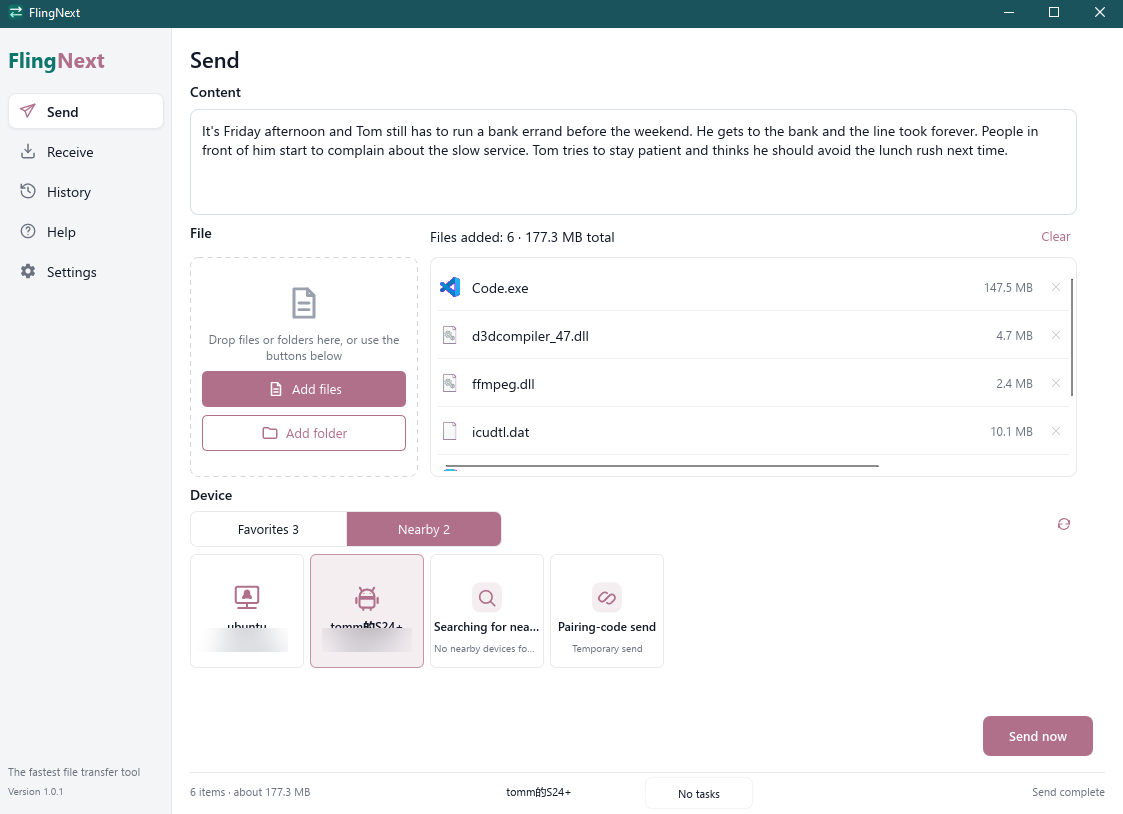
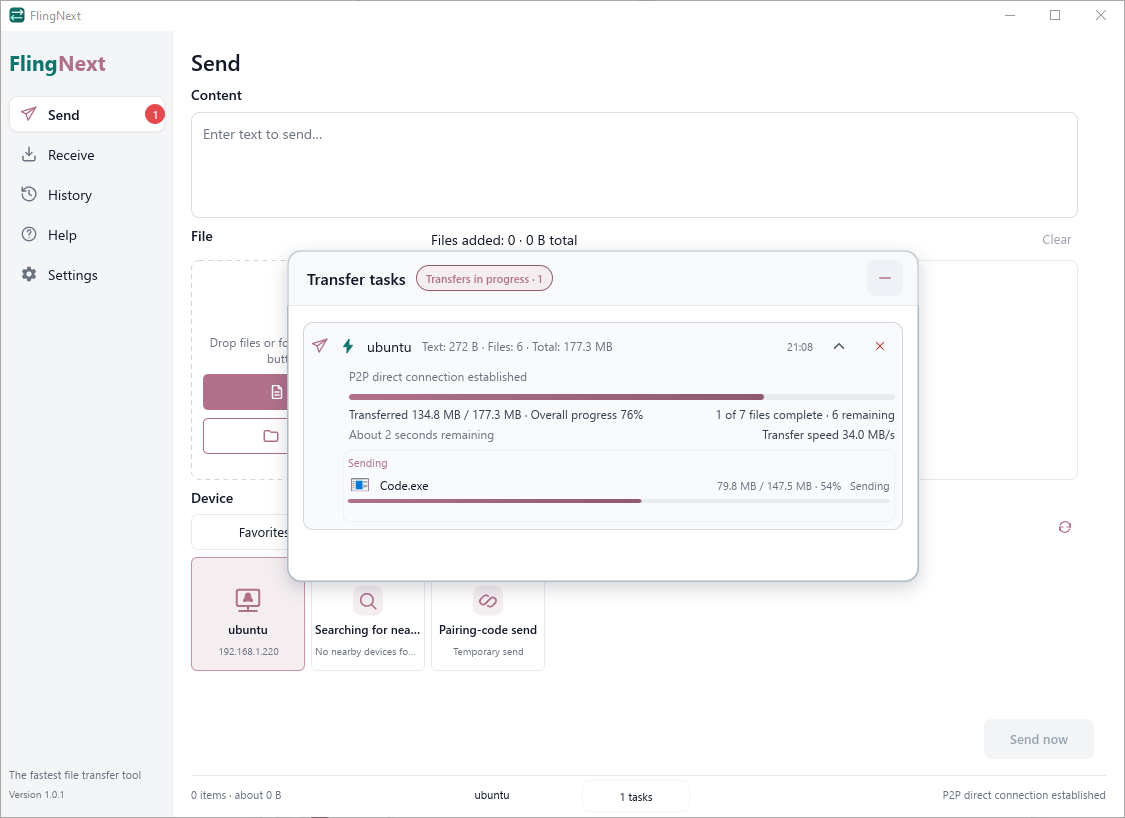
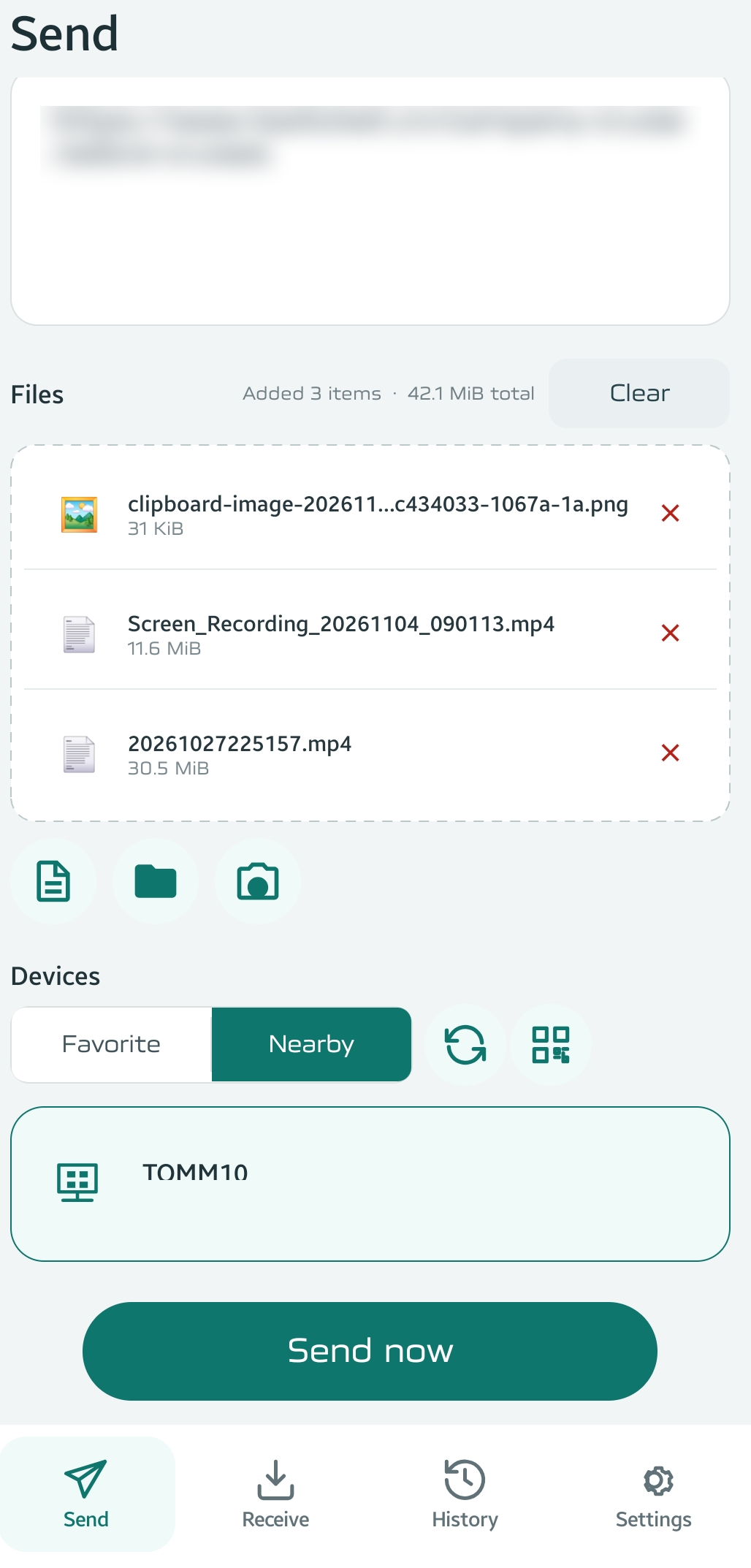
Pick files or folders, or just copy text. The transfer goes direct device to device, with a task window showing progress — and a retry if it fails.
Built for moving files, not for uploading them
Device to device when a direct connection works. LAN is fast; remote still goes direct when it can.
Copy on one device, send the text or image to the other yourself. Text moves the same direct way as files — no automatic background sync.
Trusted devices stay pinned with an identity code. Nearby devices show up without typing anything.
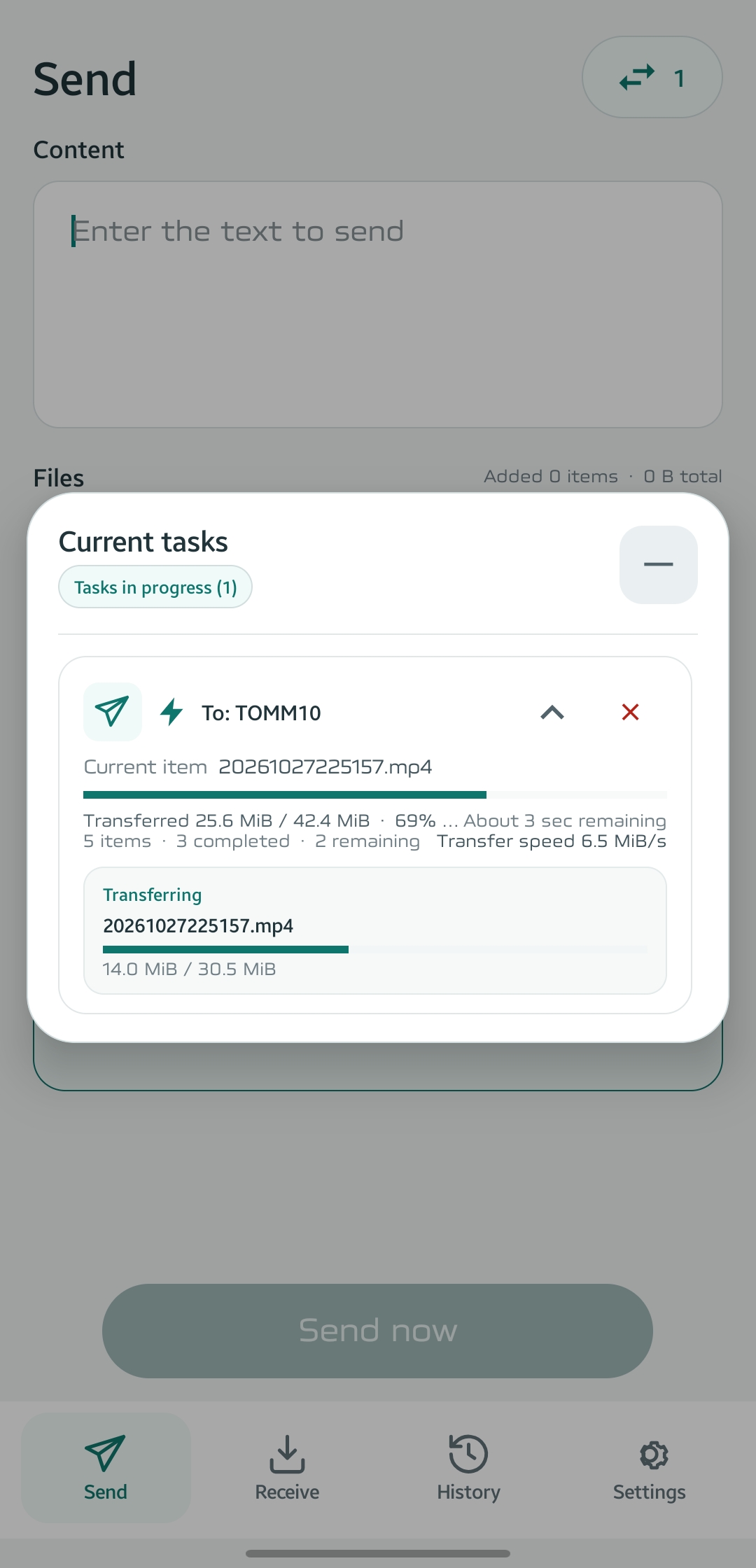
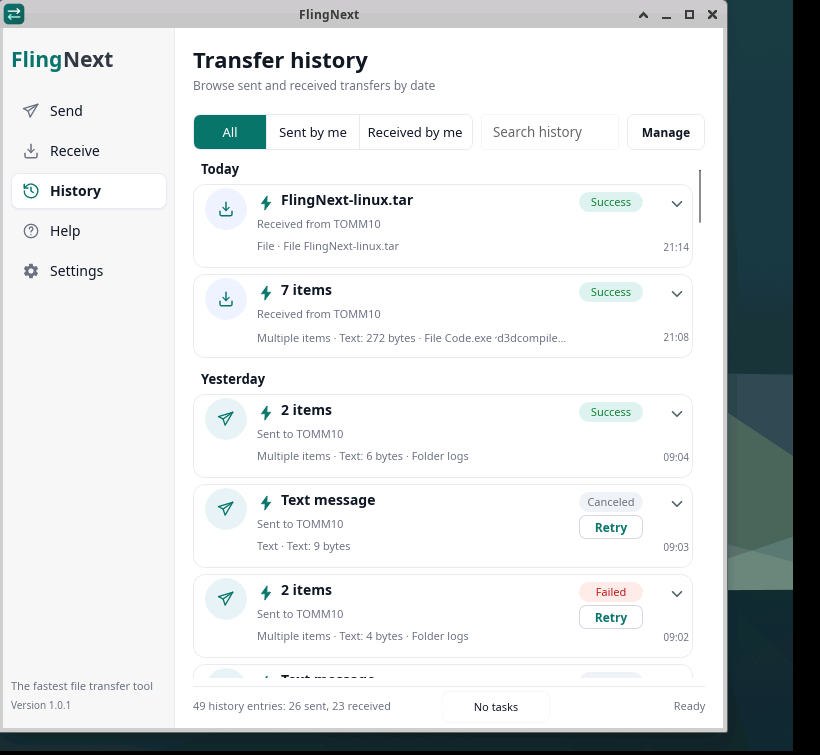
A separate window shows every task, its progress and its state. Failed tasks stay there with a retry — they don’t disappear. Interrupted transfers resume where they left off: the receiver keeps the confirmed part and the sender continues from there.
If a direct connection really can’t be made, traffic falls back to a relay. Direct first, relay only when needed — and encrypted either way.
Use your own relay server instead of the default one — on desktop and CLI. Your traffic, your relay, your control. (Not on Android.)
When a relay is needed, FlingNext automatically uses a lower-latency relay — no manual picking, no slow default.
Your files are not uploaded to a server to wait for download. They go from your device to the other device, encrypted in transit.
Phone, computer or tablet (Android tablets only — no iPad client yet) — install, pair once with a code, and send. No account, no cable, no cloud account to sign into.
What 1.0.0 adds
Interface in English, Chinese, French, Italian, Japanese, Spanish, German and Korean.
Your file is snapshotted before sending — if you edit the original mid-transfer, the send still completes with the version you started with.
The in-app help page links straight to this page, per platform — Windows, macOS, Linux, Android and iOS.
Multi-task transfers, a pending-request queue, received images you can share or open, and a dark theme.
Desktop and Android are now the same version, 1.0.0 — no more two different version numbers.
The tray icon works reliably now, including a fallback on systems without a tray.
FlingNext vs. the usual ways
| FlingNext | Chat app / WeChat | Cloud drive | AirDrop | |
|---|---|---|---|---|
| Cross-platform | Windows · macOS · Linux · Android | Yes | Yes | Apple only |
| Files stored in the cloud | No — direct transfer | Yes | Yes | No |
| Account needed to receive | No — a pairing code is enough | Yes | Usually yes | No |
| Folders & large files | Built for files and folders | Compressed, size limits | Upload, then download | Nearby Apple devices only |
LocalSend is great — on one network. FlingNext goes further.
LocalSend is a free, open-source AirDrop alternative for nearby devices. It is the right tool when both devices are on the same Wi-Fi. FlingNext starts from the same idea — direct, no cloud upload, no account — and adds the parts LocalSend does not do: the internet, a relay fallback, and pinned devices.
| FlingNext | LocalSend | |
|---|---|---|
| Same Wi-Fi / LAN | Yes — direct P2P | Yes — direct, encrypted |
| Across the internet | Yes — P2P hole punching, relay fallback | No — same network only |
| Relay when direct fails | Yes — plus custom relay (desktop & CLI) and a lower-latency relay | No relay at all |
| Clipboard | Yes — send text and images manually | Messages only, no clipboard send |
| Pinned frequent devices | Yes — 10-digit identity code, stays pinned | Nearby list only, no identity code |
| iOS client | Yes — coming soon | Yes — iOS 12+ |
| Platforms | Windows · macOS · Linux · Android | Windows · macOS · Linux · Android · iOS |
| Open source | No — closed source, free to use for now | Yes — Apache-2.0, free |
| Account needed | No | No |
| Files stored in the cloud | No — direct transfer | No — direct transfer |
Bottom line: if your devices are always on the same Wi-Fi, LocalSend already does the job. If you also need to send a file from your phone to your home PC while you are out — or to a device on another network — that is where FlingNext comes in. The one honest gap is iOS: LocalSend has it today, FlingNext does not yet.
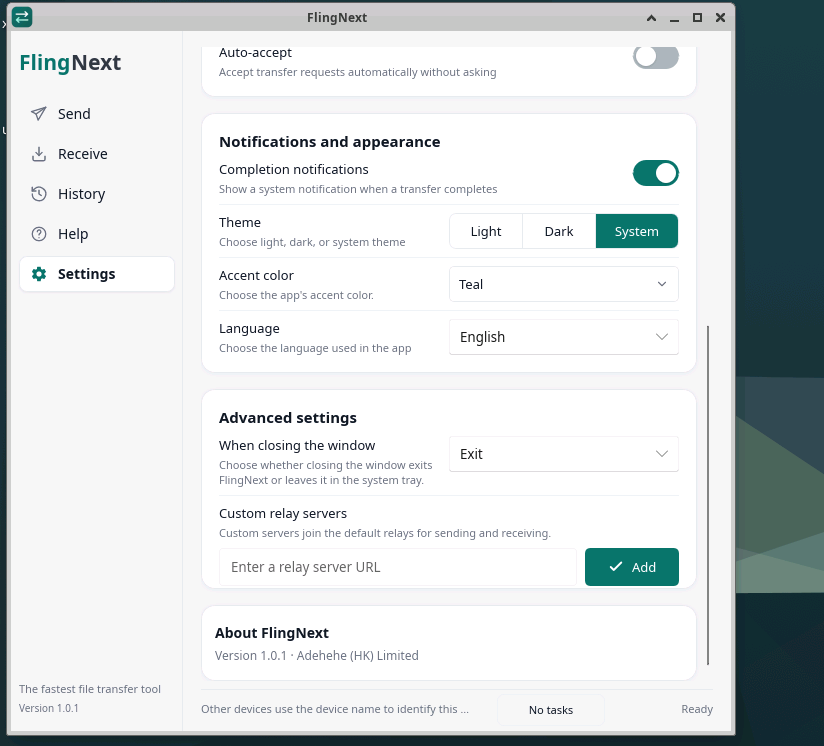
Real screenshots. No mockups.
Straight from FlingNext v1.0.4 on Windows and Android — the Send page, a live transfer, and the Android app.
Download FlingNext
Pick your platform. Each build is the same FlingNext — install it on every device you want to move files between.
Windows
Desktop app for Windows 10 / 11. Download and run, pair with a code, and send.
Portable app — no installation needed. Download and run. Not signed yet: if Windows SmartScreen says it protected your PC, click “More info” → “Run anyway”. The .zip is the same file, for networks that block .exe downloads.
macOS
Desktop app for macOS. Download the .zip below and open FlingNext.app.
xattr -cr /Applications/FlingNext.app. Signing with a Developer ID certificate is planned — not yet started.Linux
Desktop app for Linux. Built on Ubuntu 22.04, glibc 2.35 and up.
Android
Mobile app for Android. Pair with your PC, send files and clipboard both ways.
Google Play listing is not published yet — the Play link (package com.adehehe.fling) will show 404 until it goes live. The APK button above downloads v1.0.4 directly from syncpage.net.
iOS — Coming soon
There is no iOS client yet. Leave your email and we’ll tell you when it lands — no spam, one email when it’s ready.
All downloads are hosted on syncpage.net, one folder per version. The #pc link redirects to #windows.
Your files stay yours — and unreadable in transit
Transfers go device to device. FlingNext does not keep a copy of your files on a server. In direct mode there is no intermediate server at all.
Every transfer is encrypted end to end. Even when a relay is used, the relay only forwards encrypted data — it cannot read your files.
Pairing codes and identity codes are how two devices find each other. The pairing service does not see your files.
A relay is used only when a direct connection can’t be made. It moves the data through — it is not storage.
Use your own relay (desktop & CLI), and FlingNext automatically uses a lower-latency relay when one is needed.
Same FlingNext on every device — LAN at home and office, Internet anywhere. Tablet means Android tablet; there is no iPad client yet.
Questions, answered
Is FlingNext free?
Yes. Download and use FlingNext for free. There is no paid plan announced yet.
How do I pair two devices?
The sender creates a pairing code (6–8 characters). The receiver enters it once to connect. For a device you use often, enter its 10-digit identity code once — it stays pinned as a frequent device and shows its real device name.
What if a direct connection fails?
FlingNext tries a direct P2P connection first. Only when that really can’t be made does it fall back to a relay, so the transfer still completes.
macOS says the app is damaged. What do I do?
The macOS build is not yet signed and notarized. Run xattr -cr /Applications/FlingNext.app in Terminal, then open it again. Signing with a Developer ID certificate is planned — not yet started.
When is iOS coming?
There is no iOS client yet. Leave your email in the iOS section above and we’ll notify you when it’s ready.
Are my files encrypted? Can anyone in the middle read them?
Yes — transfers are encrypted end to end in transit. In direct mode there is no intermediate server at all. When a relay is needed, the relay only forwards encrypted data and cannot read your files. FlingNext does not store your files on any server.
Can I use my own relay?
Yes — on desktop and from the CLI. You can set a custom relay, and when a relay is needed FlingNext automatically uses a lower-latency relay. Android has no custom-relay setting.
Latest updates
Identity codes are now bound to one computer, online updates work on macOS and Linux, and the missing localized update messages are fixed.
All five downloads on this page were the 1.0.2 builds — Windows, macOS, Linux, Android and the Windows .zip.
Version bump to 1.0.1 — same features as 1.0.0. Windows, macOS and Linux downloads are live on this page.
Start with FlingNext today.
Free. Install it on two devices and send your first file in a minute.
Also from Adehehe: SyncPage — real-time document collaboration, in the moment.